import matplotlib.pyplot as plt
import seaborn as sns
import yfinance as yf

sns.set_theme()Descriptive Statistics of Stock Returns
Loading the Data
In this notebook we download return data for multiple stocks simultaneously and summarize their distributions.
We start by loading the data into memory. For this, we use the yfinance library. The function download() looks for specific tickers. Here the input of the function is a list of tickers ['SPY', 'MSFT', 'AAPL', 'TSLA']. You can add more tickers if you want. For each ticker this function downloads several fields, such as open, high, low, close, volume and adjusted close. In order to account for dividends and stock splits, I will only select the Adj Close field. The function pct_change() then computes percentage changes of the adjusted close prices, that is, total returns: \[
R_{t+1} = \frac{P_{t+1} + D_{t+1}}{P_{t}} - 1.
\]
Since I am using adjusted prices dividends are already included in the computations. I finally drop the Nan observations using the function dropna() since the first day lacks a percentage change in the price. All this is done in the first line of code and the resulting dataframe is stored in a variable called dret that is a shortcut for daily returns.
The second line of code dret.columns.name = None is just a convenience to make sure that the Pandas dataframe does not have a name for the column index. Otherwise the columns become multi-indexed and the labels on the graphs look odd.
Finally, display(dret) prints the output in a nice HTML format.
tickers = ['SPY', 'MSFT', 'AAPL', 'TSLA']
dret = 100*(yf
            .download(tickers, start='2015-01-01', auto_adjust=False, progress=False).loc[:, 'Adj Close']
            .pct_change()
            .dropna()
            .round(4)
            )
dret.columns.name = None
display(dret)| AAPL | MSFT | SPY | TSLA | |
|---|---|---|---|---|
| Date | ||||
| 2015-01-05 | -2.82 | -0.92 | -1.81 | -4.20 |
| 2015-01-06 | 0.01 | -1.47 | -0.94 | 0.57 |
| 2015-01-07 | 1.40 | 1.27 | 1.25 | -0.16 |
| 2015-01-08 | 3.84 | 2.94 | 1.77 | -0.16 |
| 2015-01-09 | 0.11 | -0.84 | -0.80 | -1.88 |
| ... | ... | ... | ... | ... |
| 2026-02-20 | 1.54 | -0.31 | 0.72 | 0.03 |
| 2026-02-23 | 0.60 | -3.21 | -1.02 | -2.91 |
| 2026-02-24 | 2.24 | 1.18 | 0.73 | 2.39 |
| 2026-02-25 | 0.77 | 2.98 | 0.84 | 1.96 |
| 2026-02-26 | -0.47 | 0.28 | -0.56 | -2.11 |
2803 rows × 4 columns
The resulting Pandas dataframe contains the daily returns for all four tickers. One nice thing about Pandas dataframes is that they can be easily plotted. The function plot() generates a plot of the dataframe. The argument subplots=True generates a different plot for each ticker. You can adjust the size of the plot with the argument figsize. The argument sharey=True makes sure that the scale of the y-axis for all stocks is the same.
dret.plot(subplots=True, figsize=(12, 16), sharey=True)
plt.show()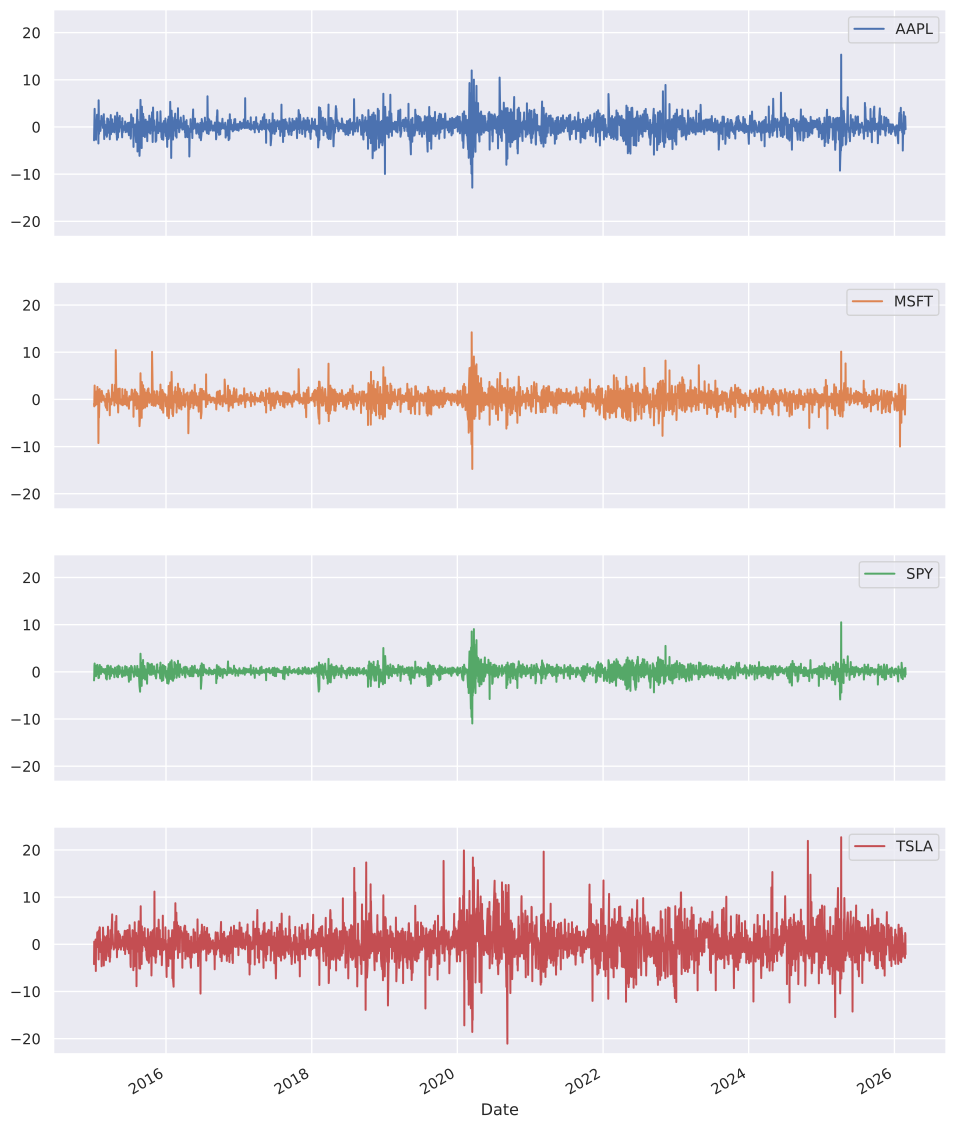
One thing that is clear is that daily stock returns are volatile. Also, there are periods of time when volatility is higher. The high volatility seems to cluster.
Descriptive Statistics
Another way to look into this data is to compute simple statistics such as mean, standard deviation, minimum, maximum, etc. The function describe() provides such functionality. It is not surprising that TSLA exhibits the highest volatility.
dret.describe().round(2)| AAPL | MSFT | SPY | TSLA | |
|---|---|---|---|---|
| count | 2803.00 | 2803.00 | 2803.00 | 2803.00 |
| mean | 0.10 | 0.10 | 0.06 | 0.18 |
| std | 1.82 | 1.71 | 1.12 | 3.62 |
| min | -12.86 | -14.74 | -10.94 | -21.06 |
| 25% | -0.73 | -0.68 | -0.37 | -1.66 |
| 50% | 0.10 | 0.09 | 0.06 | 0.12 |
| 75% | 0.99 | 0.94 | 0.59 | 1.95 |
| max | 15.33 | 14.22 | 10.50 | 22.69 |
First, the table shows that the mean daily return for all stocks is very small compared to the standard deviation. Second, we observe that the standard deviation of some stocks like TSLA is more than double the standard deviation of the SPY. This is consistent with the inter-quartile range for each stock, which is several times wider for TSLA than for the SPY. Of course, a visual representation of this is always helpful.
sns.histplot(dret[['SPY', 'TSLA']], bins=50, alpha=0.6)
plt.xlabel('Daily Return (%)')
plt.ylabel('Count')
plt.title('Distribution of Daily Returns: SPY vs TSLA')
plt.show()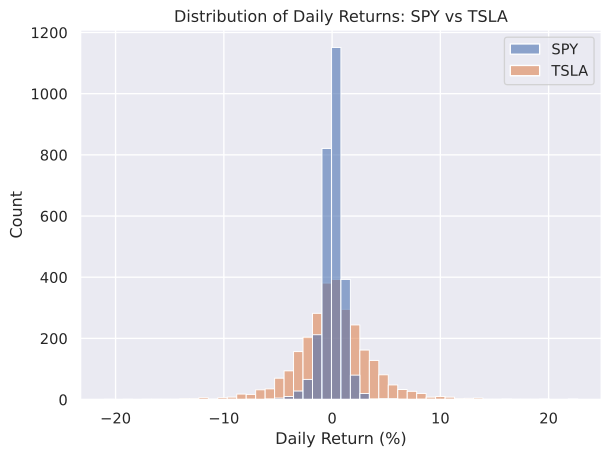
The figure shows that the histogram for daily returns of TSLA is much wider than the histogram for returns on the SPY.
We can also look at how these stocks are correlated with each other. The function corr() generates a correlation matrix between stock return pairs.
dret.corr().round(2)| AAPL | MSFT | SPY | TSLA | |
|---|---|---|---|---|
| AAPL | 1.00 | 0.65 | 0.74 | 0.43 |
| MSFT | 0.65 | 1.00 | 0.78 | 0.40 |
| SPY | 0.74 | 0.78 | 1.00 | 0.49 |
| TSLA | 0.43 | 0.40 | 0.49 | 1.00 |
TSLA somehow has a much lower correlation with the S&P 500 here proxied by the SPY.
Practice Problems
Problem 1 Compute the mean and standard deviation of monthly returns for NVDA, AMD and INTC. In your computations, use data from January 2015 until May 2023.
Solution
tickers = ['NVDA', 'AMD', 'INTC']
mret = 100*(yf
            .download(tickers, start='2015-01-01', end='2023-05-01', auto_adjust=False, progress=False).loc[:, 'Adj Close']
            .resample('ME')
            .last()
            .pct_change()
            .dropna()
            )
mret.columns.name = None
mret.describe().loc[['mean', 'std'], :].round(2)| AMD | INTC | NVDA | |
|---|---|---|---|
| mean | 5.04 | 0.51 | 5.13 |
| std | 17.00 | 8.12 | 13.61 |
Problem 2 Compute the correlation matrix of the monthly returns computed in Problem 1.
Solution
mret.corr().round(2)| AMD | INTC | NVDA | |
|---|---|---|---|
| AMD | 1.00 | 0.22 | 0.54 |
| INTC | 0.22 | 1.00 | 0.43 |
| NVDA | 0.54 | 0.43 | 1.00 |