import pandas as pd
import matplotlib.pyplot as plt
import seaborn as sns
import yfinance as yf

sns.set_theme()Computing Returns
Defining Returns
In finance, the net rate of return \(R_{t+1}\) of a stock from time \(t\) to time \(t+1\) is defined as: \[ R_{t+1} = \frac{P_{t+1} + D_{t}}{P_{t}} - 1 = \frac{P^{\mathit{adj}}_{t+1}}{P^{\mathit{adj}}_{t}} - 1 \] where \(P_{t}\) denotes the price of the stock and \(P_{t}^{\mathit{adj}}\) is the adjusted price at time \(t\). We will use the second expression to compute the net rate of return. In the following we refer to the net rate of return just as the return of the stock.
According to the previous definition, the return of the security depends on the frequency of the data. We will start by computing daily returns and we will then see how to compute monthly returns.
Daily Returns
We first import the required libraries.
We then download stock price data for Apple (ticker: AAPL) from Jan-01 2012 until the most recent date. Since our objective is to compute daily returns I only keep the Adj Close column.
df = yf.download(tickers='AAPL', start='2012-01-01', auto_adjust=False, progress=False, multi_level_index=False).loc[:, ['Adj Close']]
display(df)| Adj Close | |
|---|---|
| Date | |
| 2012-01-03 | 12.321687 |
| 2012-01-04 | 12.387905 |
| 2012-01-05 | 12.525435 |
| 2012-01-06 | 12.656377 |
| 2012-01-09 | 12.636299 |
| ... | ... |
| 2026-02-24 | 272.140015 |
| 2026-02-25 | 274.230011 |
| 2026-02-26 | 272.950012 |
| 2026-02-27 | 264.179993 |
| 2026-03-02 | 264.720001 |
3560 rows × 1 columns
The variable df is a Pandas dataframe containing daily adjusted close prices for AAPL. The method pct_change() transforms the column Adj Close into percentage changes. It does not change the name of the column, though. Therefore, df.pct_change() defines a new dataframe in which the column Adj Close contains the daily returns of AAPL.
retd = df.pct_change()
display(retd)| Adj Close | |
|---|---|
| Date | |
| 2012-01-03 | NaN |
| 2012-01-04 | 0.005374 |
| 2012-01-05 | 0.011102 |
| 2012-01-06 | 0.010454 |
| 2012-01-09 | -0.001586 |
| ... | ... |
| 2026-02-24 | 0.022391 |
| 2026-02-25 | 0.007680 |
| 2026-02-26 | -0.004668 |
| 2026-02-27 | -0.032130 |
| 2026-03-02 | 0.002044 |
3560 rows × 1 columns
We can use the method rename() to change the name of the column from Adj Close into Daily Return. We then chain dropna() to drop the first observation, which is NaN since there is no prior price to compute a return from. We reassign the result back to retd.
retd = retd.rename(columns={'Adj Close': 'Daily Return'}).dropna()
display(retd)| Daily Return | |
|---|---|
| Date | |
| 2012-01-04 | 0.005374 |
| 2012-01-05 | 0.011102 |
| 2012-01-06 | 0.010454 |
| 2012-01-09 | -0.001586 |
| 2012-01-10 | 0.003580 |
| ... | ... |
| 2026-02-24 | 0.022391 |
| 2026-02-25 | 0.007680 |
| 2026-02-26 | -0.004668 |
| 2026-02-27 | -0.032130 |
| 2026-03-02 | 0.002044 |
3559 rows × 1 columns
We can then plot the dataframe by using the method plot().
retd.plot()
plt.title('Daily Return of AAPL')
plt.ylabel('Daily Return')
plt.show()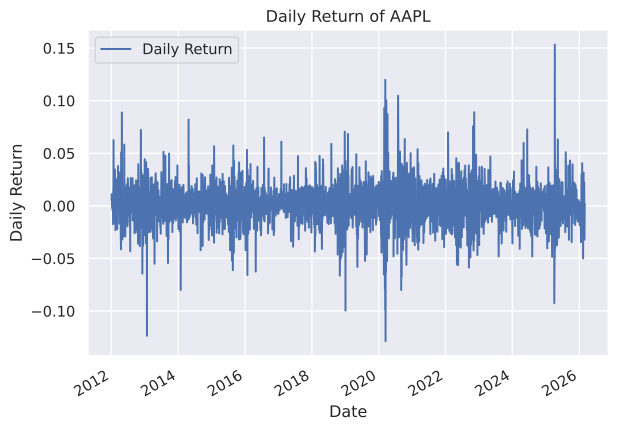
The figure shows that there are frequent jumps in the data. Any important surprise could affect the stock significantly. Another way to see this is to plot the histogram of daily returns. The kde=True argument adds a kernel density estimate — a smoothed curve that approximates the shape of the distribution, making it easier to judge whether returns look approximately normal.
sns.histplot(retd['Daily Return'], bins=50, kde=True)
plt.xlabel('Daily Return')
plt.ylabel('Count')
plt.title('Histogram of Daily Returns of AAPL')
plt.show()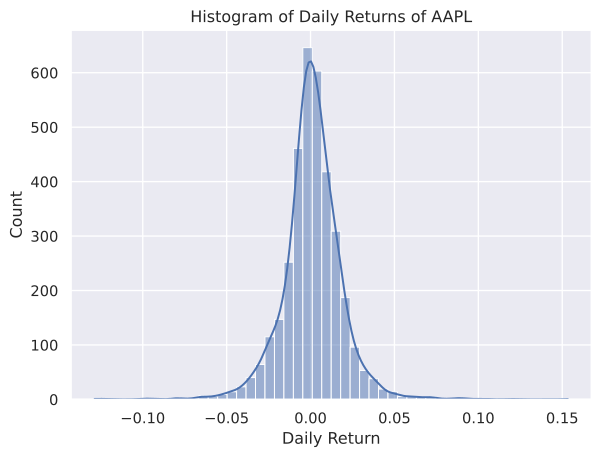
The histogram of daily returns looks like a normal probability density. The extreme returns on the tails, though, happen too often compared to a normal distribution. This is a widely known phenomenon of stock returns.
Monthly Returns
The monthly return can be computed similarly. But we need to resample the data at a monthly frequency.
To resample data in a Pandas dataframe, you can use the resample() method which groups the data by a specified time interval and allows you to apply a function to each group. The method resample('ME') resamples the data at a monthly frequency. To keep the last observation for each month we apply the method last() to resample('ME'). We can then compute the monthly returns by applying pct_change() to our monthly adjusted price data.
As before, we rename the column Adj Close to Monthly Return and drop the first observation. The resulting dataframe is presented below.
retm = (df.loc[:, ['Adj Close']].resample('ME').last().pct_change()
        .rename(columns={'Adj Close': 'Monthly Return'}).dropna())
display(retm)| Monthly Return | |
|---|---|
| Date | |
| 2012-02-29 | 0.188311 |
| 2012-03-31 | 0.105284 |
| 2012-04-30 | -0.025970 |
| 2012-05-31 | -0.010702 |
| 2012-06-30 | 0.010853 |
| ... | ... |
| 2025-11-30 | 0.032364 |
| 2025-12-31 | -0.025067 |
| 2026-01-31 | -0.045538 |
| 2026-02-28 | 0.019066 |
| 2026-03-31 | 0.002044 |
170 rows × 1 columns
We can also generate a plot of the monthly return series.
retm.plot()
plt.title('Monthly Return of AAPL')
plt.ylabel('Monthly Return')
plt.show()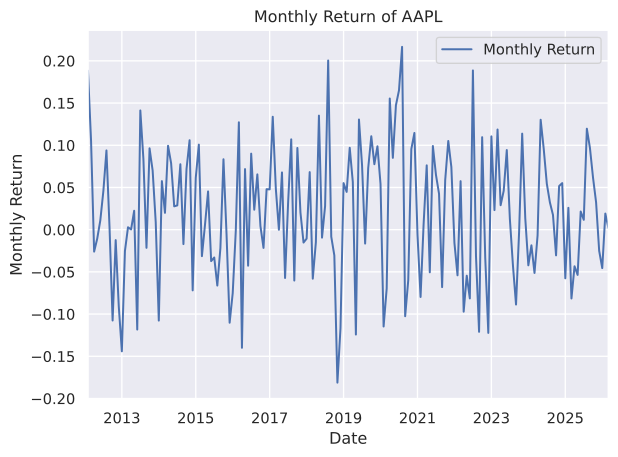
Note that yfinance provides a built-in interval='1mo' argument in yf.download() that returns monthly data directly. However, it follows Yahoo Finance’s convention of measuring returns from the 1st to the 1st of each month, which does not correspond to actual month-end prices. Our approach — taking the last available price of each calendar month via resample('ME').last() — uses month-end to month-end returns, which is the standard convention in both academic research and professional practice.
Lag Operations
In many finance applications — such as building trading portfolios or computing autocorrelation — we need lagged variables. A lagged variable at time \(t\) contains the value from the previous period \(t-1\).
To illustrate, consider the following small example with a series of returns.
ret = {'Return': [0.1, -0.05, 0.12, 0.03, -0.06]}
time = [1, 2, 3, 4, 5]
df_example = pd.DataFrame(data=ret, index=time)
df_example.index.name = 'Time'
display(df_example)| Return | |
|---|---|
| Time | |
| 1 | 0.10 |
| 2 | -0.05 |
| 3 | 0.12 |
| 4 | 0.03 |
| 5 | -0.06 |
In Pandas, a variable is lagged using the shift() method. shift(1) shifts the data one period forward, so the value at time \(t\) becomes the value at time \(t+1\). We can add a new column to a dataframe by assigning to df['column_name'].
df_example['Lagged Return'] = df_example['Return'].shift(1)
display(df_example)| Return | Lagged Return | |
|---|---|---|
| Time | ||
| 1 | 0.10 | NaN |
| 2 | -0.05 | 0.10 |
| 3 | 0.12 | -0.05 |
| 4 | 0.03 | 0.12 |
| 5 | -0.06 | 0.03 |
At time 2, Return is -0.05 while Lagged Return takes the value from the prior period. The value of Lagged Return at time 1 is NaN (Not a Number) since there is no previous observation.
We can also compute new columns from existing ones. For example, the product of Return and Lagged Return:
df_example['Product'] = df_example['Return'] * df_example['Lagged Return']
df_example = df_example.dropna()
display(df_example)| Return | Lagged Return | Product | |
|---|---|---|---|
| Time | |||
| 2 | -0.05 | 0.10 | -0.0050 |
| 3 | 0.12 | -0.05 | -0.0060 |
| 4 | 0.03 | 0.12 | 0.0036 |
| 5 | -0.06 | 0.03 | -0.0018 |
Applying this to real data, we can examine whether past daily returns of AAPL are related to future returns. We create a lagged column from retd and plot today’s return against yesterday’s return.
retd_lag = retd.copy()
retd_lag['Lagged Return'] = retd['Daily Return'].shift(1)
retd_lag = retd_lag.dropna()
display(retd_lag)| Daily Return | Lagged Return | |
|---|---|---|
| Date | ||
| 2012-01-05 | 0.011102 | 0.005374 |
| 2012-01-06 | 0.010454 | 0.011102 |
| 2012-01-09 | -0.001586 | 0.010454 |
| 2012-01-10 | 0.003580 | -0.001586 |
| 2012-01-11 | -0.001630 | 0.003580 |
| ... | ... | ... |
| 2026-02-24 | 0.022391 | 0.006047 |
| 2026-02-25 | 0.007680 | 0.022391 |
| 2026-02-26 | -0.004668 | 0.007680 |
| 2026-02-27 | -0.032130 | -0.004668 |
| 2026-03-02 | 0.002044 | -0.032130 |
3558 rows × 2 columns
sns.scatterplot(data=retd_lag, x='Lagged Return', y='Daily Return', alpha=0.3)
plt.xlabel('Return at $t-1$')
plt.ylabel('Return at $t$')
plt.title("AAPL: Today's Return vs Yesterday's Return")
plt.show()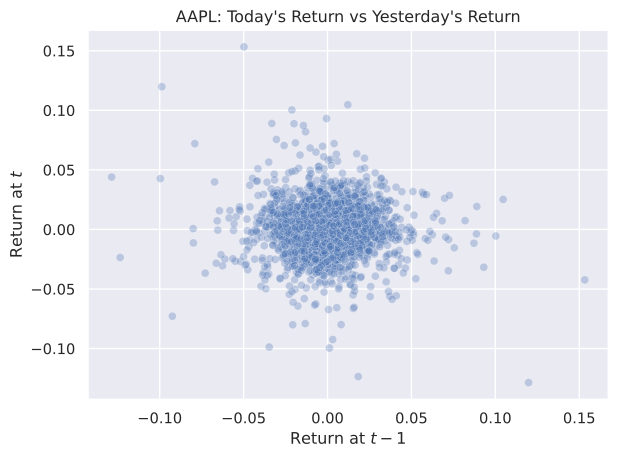
The absence of a clear pattern is consistent with the efficient market hypothesis, which states that past price information is already reflected in current prices, making daily stock returns approximately unpredictable from one day to the next. In Module 5, we formally test this hypothesis by regressing \(r_t\) on \(r_{t-1}\) and checking whether the slope coefficient is statistically different from zero.
Practice Problems
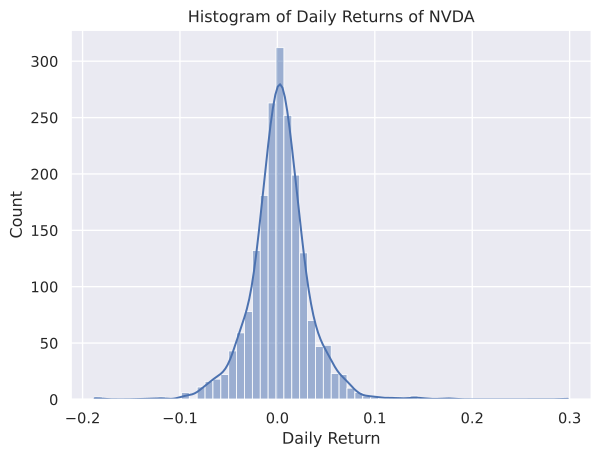
Problem 1 Generate a histogram of NVDA daily returns using daily Adj Close prices from July 1, 2015 until May 1, 2023. Use 60 bins to generate the histogram.
Solution
df = yf.download(tickers='NVDA', start='2015-07-01', end='2023-05-01', auto_adjust=False, progress=False, multi_level_index=False).loc[:, ['Adj Close']].pct_change().dropna()
df.rename(columns={'Adj Close': 'Daily Return'}, inplace=True)
sns.histplot(df['Daily Return'], bins=60, kde=True)
plt.xlabel('Daily Return')
plt.ylabel('Count')
plt.title('Histogram of Daily Returns of NVDA')
plt.show()