import pandas as pd
import matplotlib.pyplot as plt
import seaborn as sns

sns.set_theme()Working with Data
In a previous notebook we saw that Python lists store ordered collections of items and dictionaries store key–value pairs. Pandas builds on both: a DataFrame is essentially a dictionary of columns, where each column is an ordered sequence of values. That structure gives us labeled, tabular data with built-in tools for filtering, summarizing, and plotting.
Pandas
A Pandas DataFrame is the main data structure for tabular data in Python — rows and columns, like a spreadsheet. Each column has a single data type (integers, floats, or strings), and each row represents one observation. Unlike lists, DataFrames support labeled indexing, filtering, aggregation, and plotting out of the box.
To use Pandas we import it first.
import pandas as pdWe will create a dataframe that contains the hypothetical returns of two stocks over 6 periods. We use a dictionary to create the return data for Stock 1 and Stock 2.
ret = {'Stock 1': [0.1, -0.05, 0.03, -0.02, -0.04, 0.12],
       'Stock 2': [-0.2, -0.03, 0.12, 0.05, -0.1, 0.06]}
We also create a list of dates for the returns. We will use this list to index our dataframe.
time = ['Day 1', 'Day 2', 'Day 3', 'Day 4', 'Day 5', 'Day 6']We can now create and display our dataframe.
df = pd.DataFrame(data=ret, index=time)
df.index.name = 'Date'
df| Stock 1 | Stock 2 | |
|---|---|---|
| Date | ||
| Day 1 | 0.10 | -0.20 |
| Day 2 | -0.05 | -0.03 |
| Day 3 | 0.03 | 0.12 |
| Day 4 | -0.02 | 0.05 |
| Day 5 | -0.04 | -0.10 |
| Day 6 | 0.12 | 0.06 |
A quick way to get a summary of the data is describe, which reports count, mean, standard deviation, and quartiles for each column.
df.describe()| Stock 1 | Stock 2 | |
|---|---|---|
| count | 6.000000 | 6.000000 |
| mean | 0.023333 | -0.016667 |
| std | 0.072847 | 0.118096 |
| min | -0.050000 | -0.200000 |
| 25% | -0.035000 | -0.082500 |
| 50% | 0.005000 | 0.010000 |
| 75% | 0.082500 | 0.057500 |
| max | 0.120000 | 0.120000 |
A Pandas dataframe provides methods to extract data that satisfies a certain criterion. For example, let’s see for which days the returns of Stock 1 were positive.
idx = df['Stock 1'] > 0
idx
Date
Day 1 True
Day 2 False
Day 3 True
Day 4 False
Day 5 False
Day 6 True
Name: Stock 1, dtype: boolThe condition df['Stock 1'] > 0 tests for each observation whether the return of Stock 1 is positive. It happens in days 1, 3 and 6. We can then use this series to extract the data in those days.
df[idx]| Stock 1 | Stock 2 | |
|---|---|---|
| Date | ||
| Day 1 | 0.10 | -0.20 |
| Day 3 | 0.03 | 0.12 |
| Day 6 | 0.12 | 0.06 |
We could also extract the data of particular days. Since in this case Date is indexing the dataframe we use the property loc.
df.loc[['Day 3', 'Day 5']]| Stock 1 | Stock 2 | |
|---|---|---|
| Date | ||
| Day 3 | 0.03 | 0.12 |
| Day 5 | -0.04 | -0.10 |
Finally, we can make plots directly from the Pandas dataframe by using plot. Pandas uses Matplotlib under the hood, so we call plt.show() to render the figure.
df.plot(title='Stock Returns')
plt.show()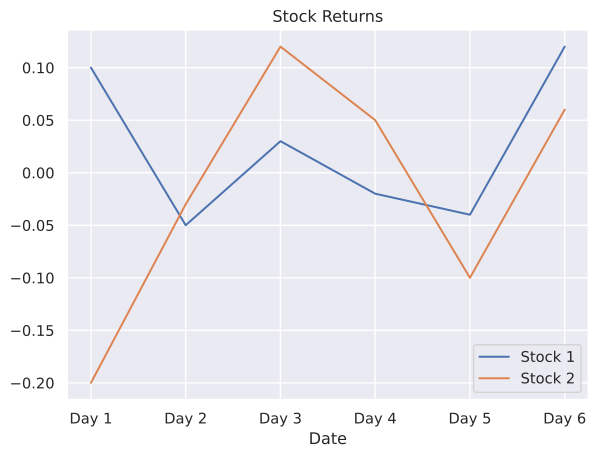
Practice Problems
Problem 1 Write a dictionary called problem_1 with the following entries:
| Name | Values |
|---|---|
| ‘List’ | [1, 3, 5, 7, 9] |
| ‘Dictionary’ | {‘a’: [1, 2], ‘b’: [3, 4]} |
How do you retrieve [3, 4]?
Solution
The objective of this problem is to show you that you can actually put anything inside a dictionary, even another dictionary!
problem_1 = {'List': [1, 3, 5, 7, 9], 'Dictionary': {'a': [1, 2], 'b': [3, 4]}}In order to get what is stored in 'b', we need first get what is stored in 'Dictionary', that is:
problem_1['Dictionary']['b'][3, 4]Problem 2 Create a Pandas dataframe that looks like this:
| X | Y | |
|---|---|---|
| a | 2 | -5 |
| b | -7 | 3 |
| c | 1 | 1 |
| d | -6 | -9 |
where the first column is the index.
Solution
We can do as before and first create a dictionary with the data, and create the Pandas dataframe from there.
data = {'X': [2, -7, 1, -6], 'Y': [-5, 3, 1, -9]}
idx2 = ['a', 'b', 'c', 'd']
df2 = pd.DataFrame(data=data, index=idx2)
df2| X | Y | |
|---|---|---|
| a | 2 | -5 |
| b | -7 | 3 |
| c | 1 | 1 |
| d | -6 | -9 |