import matplotlib.pyplot as plt
import seaborn as sns
import yfinance as yf

sns.set_theme()Downloading Financial Data
The Package yfinance
We’ll use the yfinance package to download stock price data from Yahoo! Finance. This Python library provides a simple interface for retrieving historical market data for stocks, indices, and other financial instruments. Before using it, you’ll need to install it first.
Anaconda
If you are using Anaconda you need to install yfinance first before you use it for the first time. In an Anaconda command prompt type:
pip install yfinance --upgradeor in a Jupyter cell you can type:
!pip install yfinance --upgrade --quietGoogle Colab
In Google Colab, yfinance is pre-installed, but you should upgrade to the latest version due to recent Yahoo! Finance API changes. Run this in a code cell:
!pip install yfinance --upgrade --quietImporting the Library
You can import the library as follows.
Data
In order to estimate asset pricing models, we need to get data on stock returns, for both a particular security and the market. An easy way to do the is to download this data from the web. We start by defining the security that we want to analyze and from which date we want to start the analysis.
To get the data, we use the function download() in yfinance. For example, to get the data for Microsoft (ticker: MSFT) we type:
yf.download(tickers='MSFT', auto_adjust=False, progress=False, multi_level_index=False)| Adj Close | Close | High | Low | Open | Volume | |
|---|---|---|---|---|---|---|
| Date | ||||||
| 2026-01-28 | 480.533203 | 481.630005 | 483.739990 | 478.000000 | 483.209991 | 36875400 |
| 2026-01-29 | 432.512817 | 433.500000 | 442.500000 | 421.019989 | 439.989990 | 128855300 |
| 2026-01-30 | 429.310120 | 430.290009 | 439.600006 | 426.450012 | 439.170013 | 58566800 |
| 2026-02-02 | 422.405884 | 423.369995 | 430.739990 | 422.250000 | 430.239990 | 42219900 |
| 2026-02-03 | 410.273560 | 411.209991 | 422.049988 | 408.559998 | 422.010010 | 61424100 |
| 2026-02-04 | 413.246796 | 414.190002 | 419.799988 | 409.239990 | 411.000000 | 45012400 |
| 2026-02-05 | 392.773529 | 393.670013 | 408.299988 | 392.320007 | 407.440002 | 66289200 |
| 2026-02-06 | 400.226501 | 401.140015 | 401.790009 | 392.920013 | 399.170013 | 53515300 |
| 2026-02-09 | 412.658142 | 413.600006 | 414.890015 | 400.869995 | 404.850006 | 45480500 |
| 2026-02-10 | 412.328857 | 413.269989 | 423.679993 | 412.700012 | 419.619995 | 44857900 |
| 2026-02-11 | 403.449127 | 404.369995 | 416.459991 | 401.010010 | 416.179993 | 42491000 |
| 2026-02-12 | 400.924896 | 401.839996 | 406.200012 | 398.010010 | 405.000000 | 40802400 |
| 2026-02-13 | 400.406097 | 401.320007 | 405.540009 | 398.049988 | 404.450012 | 34091600 |
| 2026-02-17 | 395.956238 | 396.859985 | 400.519989 | 394.529999 | 399.220001 | 32078800 |
| 2026-02-18 | 398.690002 | 399.600006 | 402.559998 | 396.320007 | 398.130005 | 23223400 |
| 2026-02-19 | 398.459991 | 398.459991 | 404.429993 | 396.670013 | 400.690002 | 28234000 |
| 2026-02-20 | 397.230011 | 397.230011 | 400.119995 | 395.160004 | 396.109985 | 34015200 |
| 2026-02-23 | 384.470001 | 384.470001 | 395.359985 | 383.100006 | 395.000000 | 43238300 |
| 2026-02-24 | 389.000000 | 389.000000 | 389.359985 | 381.709991 | 384.140015 | 33884700 |
| 2026-02-25 | 400.600006 | 400.600006 | 401.470001 | 390.160004 | 390.529999 | 43625500 |
| 2026-02-26 | 401.720001 | 401.720001 | 407.489990 | 398.739990 | 404.709991 | 34405900 |
| 2026-02-27 | 392.739990 | 392.739990 | 396.799988 | 390.000000 | 390.992493 | 50401665 |
The output of the function download() is a Pandas dataframe. Therefore, all operations available on Pandas work on the dataframe just imported.
The yfinance library was recently updated so that the Close column now shows total return prices by default. To get both the unadjusted price and the adjusted price separately, we need to set auto_adjust=False when downloading data.
I use the option progress=False to suppress the status bar when downloading the data. The code runs just as fine without it.
Also, note that the dataset by default spans all dates for dates for which data is available. We can specify an arbitrary starting date by adding, for example, start='2012-01-01'.
yf.download(tickers='MSFT', start='2012-01-01', auto_adjust=False, progress=False, multi_level_index=False)| Adj Close | Close | High | Low | Open | Volume | |
|---|---|---|---|---|---|---|
| Date | ||||||
| 2012-01-03 | 20.917694 | 26.770000 | 26.959999 | 26.389999 | 26.549999 | 64731500 |
| 2012-01-04 | 21.409971 | 27.400000 | 27.469999 | 26.780001 | 26.820000 | 80516100 |
| 2012-01-05 | 21.628750 | 27.680000 | 27.730000 | 27.290001 | 27.379999 | 56081400 |
| 2012-01-06 | 21.964748 | 28.110001 | 28.190001 | 27.530001 | 27.530001 | 99455500 |
| 2012-01-09 | 21.675640 | 27.740000 | 28.100000 | 27.719999 | 28.049999 | 59706800 |
| ... | ... | ... | ... | ... | ... | ... |
| 2026-02-23 | 384.470001 | 384.470001 | 395.359985 | 383.100006 | 395.000000 | 43238300 |
| 2026-02-24 | 389.000000 | 389.000000 | 389.359985 | 381.709991 | 384.140015 | 33884700 |
| 2026-02-25 | 400.600006 | 400.600006 | 401.470001 | 390.160004 | 390.529999 | 43625500 |
| 2026-02-26 | 401.720001 | 401.720001 | 407.489990 | 398.739990 | 404.709991 | 34405900 |
| 2026-02-27 | 392.739990 | 392.739990 | 396.799988 | 390.000000 | 390.992493 | 50401665 |
3559 rows × 6 columns
Close v/s Adjusted Close Price
The data query produces six columns. When estimating asset pricing models we will be interested in using the adjusted close (Adj Close) column since the price series is adjusted for stock splits and dividends. Let’s compare how the Adj Close differs from the Close price.
For this, let’s extract these two series and store them in a dataframe called df. The method df.loc[:, [column_label_1, column_label_2, ..., column_label_n]] selects multiple columns from the dataframe. In our example we want to select loc[:, ['Close', 'Adj Close']].
df = yf.download(tickers='MSFT', start='2012-01-01', auto_adjust=False, progress=False, multi_level_index=False).loc[:, ['Close', 'Adj Close']]Sometimes in Python lines might get really long. A suggested way to split a long line of code into several smaller lines is to use parentheses around the code that you want to split and split whenever there is a dot.
df = (yf
      .download(tickers='MSFT', start='2012-01-01', auto_adjust=False, progress=False, multi_level_index=False)
      .loc[:, ['Close', 'Adj Close']]
      )
The previous line of code does exactly the same as the one we wrote originally, but might be easier to read and understand.
We can now compute cumulative percentage changes (cum_pct) for both series by applying to each column in df a function that divides everything by the first price. The apply() method applies a function along an axis of a DataFrame or a Series. The function can be a built-in Python function or a custom function that you define.
First, we define a function that takes a series x as input and divides the series by its initial value x[0].1
1 In the original code, I wrote x / x[0]. However, that syntax is being deprecated and the suggestion is to access the row number of the pandas dataframe using iloc.
def normalize(x):
    return x / x.iloc[0]
Then, we apply this function to our dataframe and plot it.
cum_pct = df.apply(normalize)
cum_pct.plot()
plt.title('Close v/s Adjusted Close of Microsoft')
plt.ylabel('Cumulative Return')
plt.show()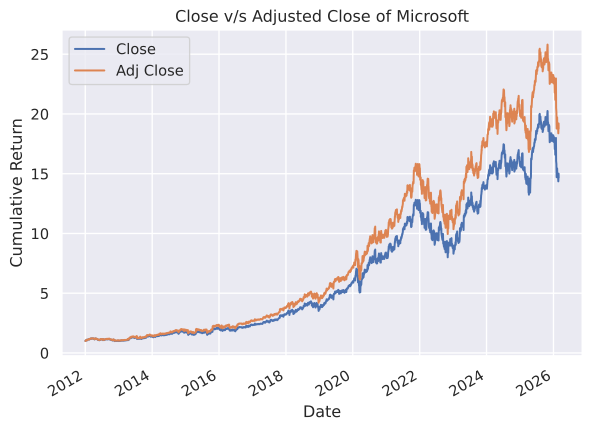
According to the graph, the impact of dividends is significant. Another way to see this is by actually computing the dividends from the two series. We will do this later.
Practice Problems
Problem 1 Plot the Close price for Nvidia Corporation (Ticker: NVDA) from July 1, 2015 until May 1, 2023.
Solution
df = yf.download(tickers='NVDA', start='2015-07-01', end='2023-05-01', auto_adjust=False, progress=False, multi_level_index=False).loc[:,['Close']]
df.plot()
plt.title('NVDA Stock Price')
plt.show()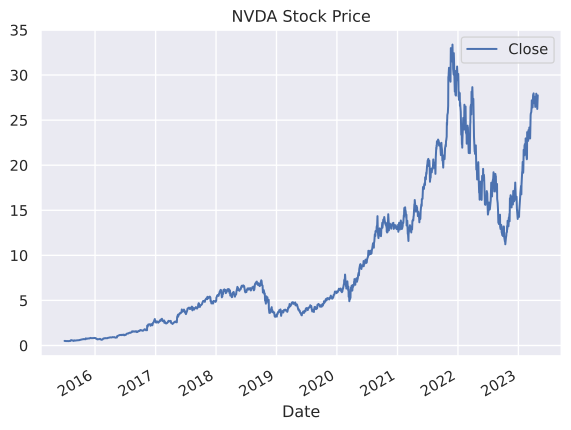
Problem 2 Plot the S&P 500 (Ticker: ^GSPC) from January 1, 2018 until May 1, 2023. Since the S&P 500 is an index you can use either the Close or Adj Close, it does not make a difference.
Solution
df = yf.download(tickers='^GSPC', start='2018-01-01', end='2023-05-01', auto_adjust=False, progress=False, multi_level_index=False).loc[:,['Close']]
df.plot()
plt.title('S&P 500')
plt.show()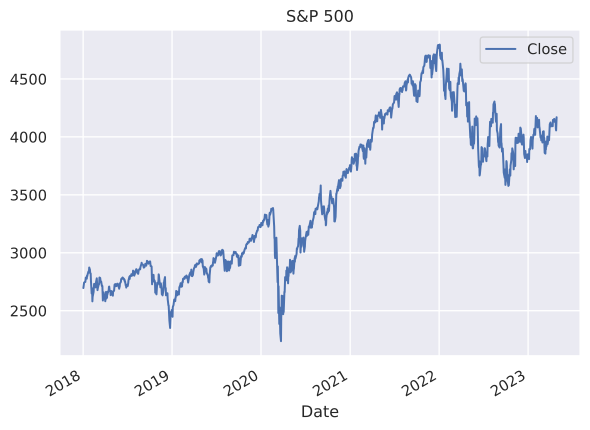
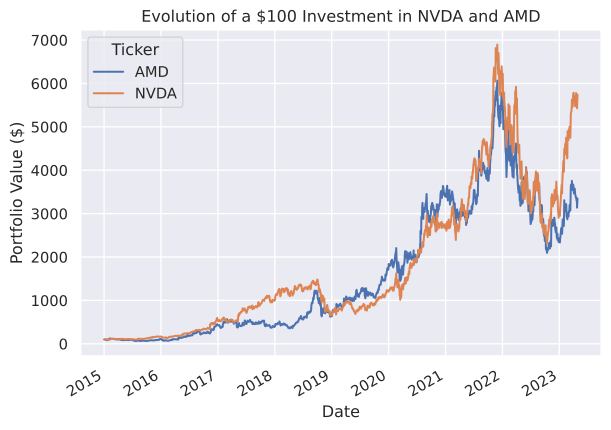
Problem 3 Imagine that you invest $100 in NVDA and AMD in January 1, 2015. Plot the evolution of each investment until May 1, 2023.
Solution
To plot the evolution of each investment, all we need to do is normalize the Adj Close evolution to 100 in January 1, 2015 for both stocks. We can use the same function we built before and multiply the result by 100. We use Adj Close instead of Close to account for stock splits and dividends.
df = (yf
      .download(tickers=['NVDA', 'AMD'], start='2015-01-01', end='2023-05-01', auto_adjust=False, progress=False)
      .loc[:, 'Adj Close']
      .apply(normalize)
      )*100
df.plot()
plt.title('Evolution of a $100 Investment in NVDA and AMD')
plt.ylabel('Portfolio Value ($)')
plt.show()